
Search for the best COBOL modernization tools and you will get lists of product names with a sentence each. Those lists are hard to use because the products on them do different jobs. A code analysis tool, a translator, a rehosting runtime and a test comparison tool can all be described as COBOL modernization tools, and a real program usually needs several of them. Comparing them against each other is like comparing a surveyor, a builder and a building inspector.
This guide sorts COBOL modernization tools into seven categories by the job they do, explains what each category is good at and where it runs out, shows how the categories combine under different modernization strategies, and gives a short set of questions to test any tool in any category. It does not rank vendors. Once you know which categories your program needs, the vendor shortlist within each category becomes much easier to build.
Why COBOL modernization tools are hard to compare
Three things make tool selection in this area confusing.
First, vendors describe outcomes rather than functions. “Modernize your mainframe” can mean running the same COBOL on a different machine, putting an API in front of it, converting it to Java, or replacing it with a package. The tool behind each is completely different.
Second, many products bundle several categories. A single platform may include code analysis, a rehosting runtime and some test tooling. Bundles are convenient, but each part should be judged on its own merits, because the strongest analysis tool is rarely also the strongest runtime.
Third, the same word means different things to different vendors. “Refactoring” might mean restructuring COBOL while keeping it as COBOL, or it might mean translating to another language. “AI-powered” might refer to a Gen AI model, to rule-based symbolic reasoning, or to a statistical feature buried somewhere in the product. Ask what the tool actually does to your code.
The categories below are defined by function, so that you can map any product to one or more of them.
Category 1: Discovery and static analysis tools
What they do
Discovery and analysis tools read your source code and build a model of the estate: which programs exist, which copybooks they include, which programs call which, which files and tables each program reads and writes, which transactions invoke which programs, and which JCL jobs run which steps. Better tools also measure complexity, find dead code, detect duplicated code and trace how a data field flows through the system.
When to use them
Always, and first. You cannot plan, estimate or sequence a program without an inventory. Analysis output feeds every other decision: which parts to leave alone, which to translate first, how to group programs into waves, and how much testing each wave needs. The inventory also usually reveals that the estate is larger than anyone thought, with surrounding components such as scheduler definitions, utilities, assembler routines and reports that are easy to miss.
Where they run out
Static analysis sees what the code says. What it does at run time can differ. Dynamic calls, where the program name is held in a variable, need run-time data or careful inference to resolve. Code that no longer runs in production may look alive in a static cross-reference. Pairing static analysis with run-time information, such as job logs, transaction statistics and SMF records on the mainframe, gives a more accurate picture.
What to check
- Does the tool parse your dialects and compiler options correctly, including the surrounding languages such as JCL, CICS commands and embedded SQL?
- Can it handle the size of your estate without sampling?
- Does it export its model in a form other tools and your team can use?
- How does it treat dynamic calls, copybooks with REPLACING and conditional compilation?
Category 2: Automated translation tools
What they do
Translation tools convert COBOL source into another language, most commonly Java or C#. They parse each program, build an internal representation of its meaning, and generate equivalent code in the target language. The quality range is very wide. At one end, a translator produces target-language code that mirrors COBOL structure line for line, sometimes called JOBOL when the target is Java. At the other end, a translator produces idiomatic code with proper classes, types and methods that a Java or C# developer can maintain.
Rule-based and deterministic translation
The most reliable translators apply explicit transformation rules to a precise model of the source language. They understand COBOL’s data definitions, arithmetic semantics and control flow the way a compiler does, and they apply the same rules across every program. Two properties follow. The output is consistent across the estate, so the same COBOL pattern always becomes the same target pattern. And the process is deterministic, so the same input produces the same output every time, which makes verification evidence reusable when code is reconverted. Our piece on how deterministic software transformation works explains the mechanics.
DMS, the technology behind Modernize Software, belongs in this group. It combines symbolic AI with enhanced compiler technology to parse each program in its dialect and apply transformation rules across the whole codebase.
When to use them
When the goal is to leave COBOL behind: to address skills risk, remove the dependency on COBOL runtimes, and give the business a codebase in a mainstream language. Translation is also the fastest way to move a large estate, because the rules scale in a way that manual rewriting cannot.
Where they run out
A translator’s output is only as good as its understanding of the source dialect. Estates with unusual dialects, heavy use of compiler options, embedded assembler or proprietary extensions need a translator that can be extended with new rules for those features. Translation also does not redesign the application by itself. If the architecture needs to change, that is usually a separate, later step, done on code that is already in the target language and covered by tests.
What to check
- Show the output for your own code, next to the original. Would your developers maintain it?
- How does the tool map packed decimal, binary and edited numeric fields, and what rounding and intermediate precision does it use? Money should map to exact decimal types, with Java’s BigDecimal or C#’s decimal, never to floating point.
- How are REDEFINES, OCCURS DEPENDING ON, GO TO, ALTER and PERFORM THRU handled?
- Does the output depend on a proprietary runtime library, and if so, what does that library do?
- Can the translation rules be extended for features specific to your estate?
Category 3: Gen AI code assistants
What they do
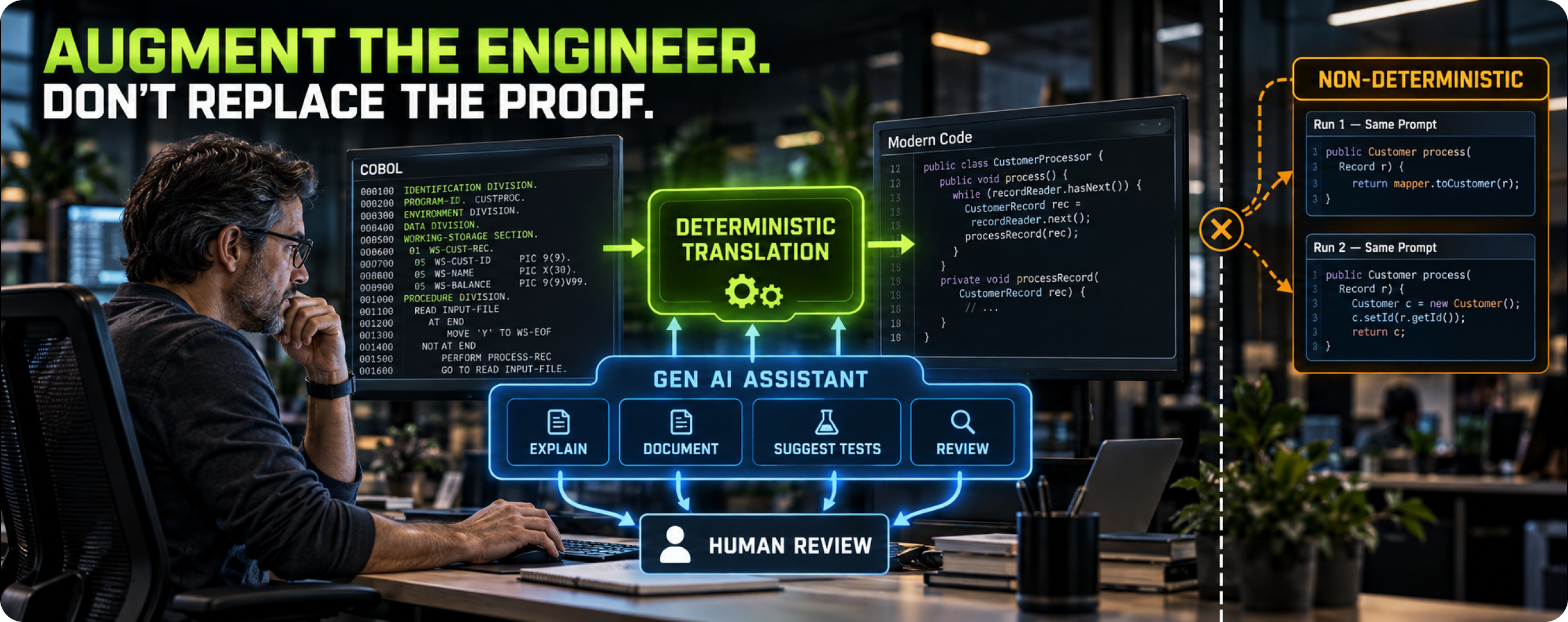
Gen AI code assistants use large language models to explain code, summarize programs, generate documentation, suggest test cases and propose code in another language. They have improved quickly and they are genuinely useful on legacy estates, particularly for helping developers who do not read COBOL understand what a program does.
When to use them
Gen AI assistants are strongest at tasks where the output is reviewed by a person or checked by a test:
- Explaining unfamiliar programs to developers and analysts.
- Drafting documentation and business rule descriptions for review.
- Suggesting test cases, including edge cases a human might miss.
- Reviewing converted code for readability and naming.
- Answering questions about the estate during analysis.
Where they run out
Language models generate output probabilistically, so the same input can produce different output on different runs, and errors are not flagged by the model. On large programs, errors in translated business logic can be subtle: a rounding difference, a misread REDEFINES, a changed sort order. Verifying every line of model-generated translation across a large estate can cost more than the translation saved. Our piece on why Gen AI alone is not enough for modernization covers these limits in detail.
A practical pattern treats Gen AI as a separate augmentation layer around a deterministic translation process: the translator does the conversion, and Gen AI helps people understand, document and test the results.
What to check
- Where are your code and prompts sent, and are they retained or used for training?
- How is output verified, and who is accountable for errors?
- Can results be reproduced for audit purposes?
- Does the assistant support your dialects, or only generic COBOL?
Category 4: Rehosting and emulation runtimes
What they do
Rehosting tools let COBOL applications run off the mainframe with minimal change. They provide a COBOL compiler and runtime for distributed platforms, along with emulation of mainframe subsystems such as CICS transaction processing, JCL batch, VSAM files and mainframe security. The application stays in COBOL; the platform underneath changes.
When to use them
When the main driver is infrastructure cost or hardware end of life, and the organization can accept keeping COBOL for now. Rehosting can move a large estate relatively quickly with limited code change, which makes it attractive under deadline pressure. It can also serve as an intermediate step, moving workloads to a platform where later translation or rearchitecture is easier.
Where they run out
The skills problem remains, because the code is still COBOL. A runtime license usually remains too, now paid to the rehosting vendor. Performance characteristics change, particularly for batch workloads that were tuned for the mainframe’s I/O. And emulated subsystems behave slightly differently from the originals in edge cases, so testing is still substantial. Our comparison of rehost, refactor and rearchitect strategies looks at what each path leaves you with after three years.
What to check
- Which dialects and subsystems are emulated, and what are the documented differences from the mainframe originals?
- What license is needed to run the rehosted application, and for how long?
- What does a later move from the rehosted state to a translated state involve?
- How are batch performance and file I/O handled at your volumes?
Category 5: API enablement and integration tools
What they do
API enablement tools expose existing COBOL transactions and programs as services, typically REST or messaging interfaces, so that new applications can call them. The COBOL stays where it is, on the mainframe or a rehosted platform, and new channels such as mobile apps, partner portals and cloud services integrate with it through the API layer.
When to use them
When the COBOL works well and the problem is access. API enablement is often the fastest way to deliver new digital services on top of stable core logic. It is also the foundation of incremental replacement, where individual functions are rebuilt one at a time behind a stable interface and traffic is routed to the new implementation as each piece is ready. Martin Fowler’s description of the strangler fig pattern is the usual reference for that approach.
Where they run out
API enablement adds a layer without removing any. The COBOL, its platform and its skills dependency remain, and the integration layer becomes another component to operate. Incremental replacement programs can also stall partway, leaving both old and new systems running indefinitely.
What to check
- What transaction types and data formats does the tool support?
- How are security, authentication and auditing handled across the boundary?
- What performance overhead does the layer add at peak volumes?
- How are COBOL data structures mapped to API payloads, including packed fields and redefined areas?
Category 6: Data migration tools
What they do
Data migration tools move data out of mainframe stores such as VSAM, IMS, Db2 and sequential files into target databases. They convert character encodings from EBCDIC, unpack packed decimal and binary fields, map hierarchical or redefined record layouts into relational tables, and reconcile the results.
When to use them
In any program that moves applications off the mainframe, whether by translation, rehosting with a new database, or replacement. Data migration usually runs as its own workstream, and it is frequently the part of the schedule that slips, because data quality problems appear only when the data is actually moved.
Where they run out
Tools convert formats; they cannot decide what the data means. Fields reused for different purposes over the years, records with invalid packed values, and redefined areas whose interpretation depends on a type code all need analysis and business decisions. Copybooks describe the intended layout, and the data does not always follow it.
What to check
- How does the tool derive target schemas from copybooks, and how much of that is automatic?
- How are REDEFINES and OCCURS DEPENDING ON mapped?
- What reconciliation reports does it produce: record counts, control totals, field-level checks?
- How does it handle invalid data in source files?
Category 7: Testing and equivalence tools
What they do
Testing tools prove that the new system behaves like the old one. They capture inputs and outputs from the legacy system, replay the same inputs against the new system, and compare results. Supporting tools generate and mask test data, manage test environments and triage differences.
When to use them
From the start of the program. Equivalence testing is the critical path of most COBOL migrations, because every converted unit has to pass it. Building the capture and comparison harness before conversion begins means every converted program can be tested as soon as it exists.
Where they run out
A comparison tool reports differences; it cannot decide which ones matter. Timestamps, sequence numbers and environment-specific values create noise that has to be filtered. And the quality of the test depends entirely on the test data: if the data never exercises a path, the tool will never find a difference in it.
What to check
- Can the tool compare outputs at the record and field level, with rules to ignore expected differences?
- Can it capture production-shaped data safely, with masking?
- Does it support batch outputs, online transactions and database state?
- How are differences recorded, triaged and signed off?
Supporting tools around the edges
Beyond the seven categories, several kinds of tooling support a modernization program without being modernization tools themselves.
Mainframe DevOps. Source control, build automation and continuous integration for COBOL on the mainframe make it easier to change legacy code safely during a long program. The open source Zowe project provides interfaces that let modern development tools work with z/OS.
Target platform tooling. Build systems, code quality scanners, dependency management and deployment pipelines for Java or C#. Converted code should enter these from day one, so that it is held to the same standards as newly written code.
Program management. Tools that track the status of every program through analysis, conversion, testing and cutover. On an estate of thousands of programs, this tracking becomes a significant piece of work in its own right.
How the categories combine by strategy
Different strategies draw on different combinations of tools. The table shows which categories are central, useful or rarely needed for each common approach.
| Strategy | Central categories | Useful categories | Rarely needed |
|---|---|---|---|
| Keep and optimize on the mainframe | Discovery and analysis | API enablement, testing | Translation, rehosting |
| API-enable and extend | API enablement, discovery | Testing, Gen AI assistants | Translation, data migration |
| Rehost | Rehosting runtime, testing | Discovery, data migration | Translation |
| Translate to Java or C# | Translation, testing, data migration | Discovery, Gen AI assistants | Rehosting |
| Rearchitect or rewrite | Discovery, testing | Gen AI assistants, API enablement, data migration | Translation (sometimes used first, then refactored) |
| Replace with a package | Data migration, discovery | Testing, API enablement | Translation, rehosting |
Two patterns stand out. Discovery and testing tools appear in almost every strategy, which is why they are worth selecting carefully and early. And the categories that do the core transformation differ completely by strategy, so the strategy decision should come before the transformation tool decision.
A US government review of federal legacy systems noted that successful modernizations included both transforming legacy code into a more modern language and moving legacy software to the cloud (GAO-19-471). Those are different strategies with different tool sets, and many programs use both in different parts of the estate.
A worked example: building a tool stack for a translation program
Consider an insurer with around 5,000 COBOL programs on the mainframe, a mix of CICS online processing and nightly batch, data in VSAM and Db2, and a decision to translate to Java and move to a cloud platform over several years. Its tool stack might come together in this order.
Months one to three: discovery and analysis. The insurer runs static analysis across the full estate and combines it with job logs and transaction statistics from production. The inventory finds a substantial share of programs that never execute, several hundred copybooks shared across subsystems, and a layer of assembler routines and scheduler definitions that nobody had counted. The analysis model becomes the planning basis for everything that follows.
Months two to four: testing harness. Before any conversion starts, the insurer builds capture and comparison tooling for batch outputs and for a sample of online transactions, with masked production-shaped test data. This is the tool it will use every week for the rest of the program.
Months three to six: translation pilot. Two translators are evaluated on the same pilot slice: one policy administration subsystem with its copybooks, CICS transactions, Db2 access and JCL. The insurer’s developers review both outputs, and the comparison harness verifies both. One translator is selected on the combination of verified results and maintainability.
Months four onward: data migration. Data migration tooling is selected to map VSAM files and Db2 tables into the target database, with reconciliation reports feeding the same evidence store as the equivalence tests.
Throughout: Gen AI assistants. Developers use a Gen AI assistant to explain unfamiliar programs, draft business rule documentation for review by analysts, and suggest additional test cases for rarely used policy types. Its outputs are reviewed, and nothing it produces reaches production code without passing through the translator and the test harness.
Later waves: API enablement. Programs scheduled for later waves stay on the mainframe for now, and a few of their transactions are exposed as APIs so that a new customer portal can launch before those waves are translated.
The insurer did not buy a rehosting runtime, because its strategy did not call for one. The stack follows the strategy, and each category has a defined job.
How to run a proof of concept for a COBOL modernization tool
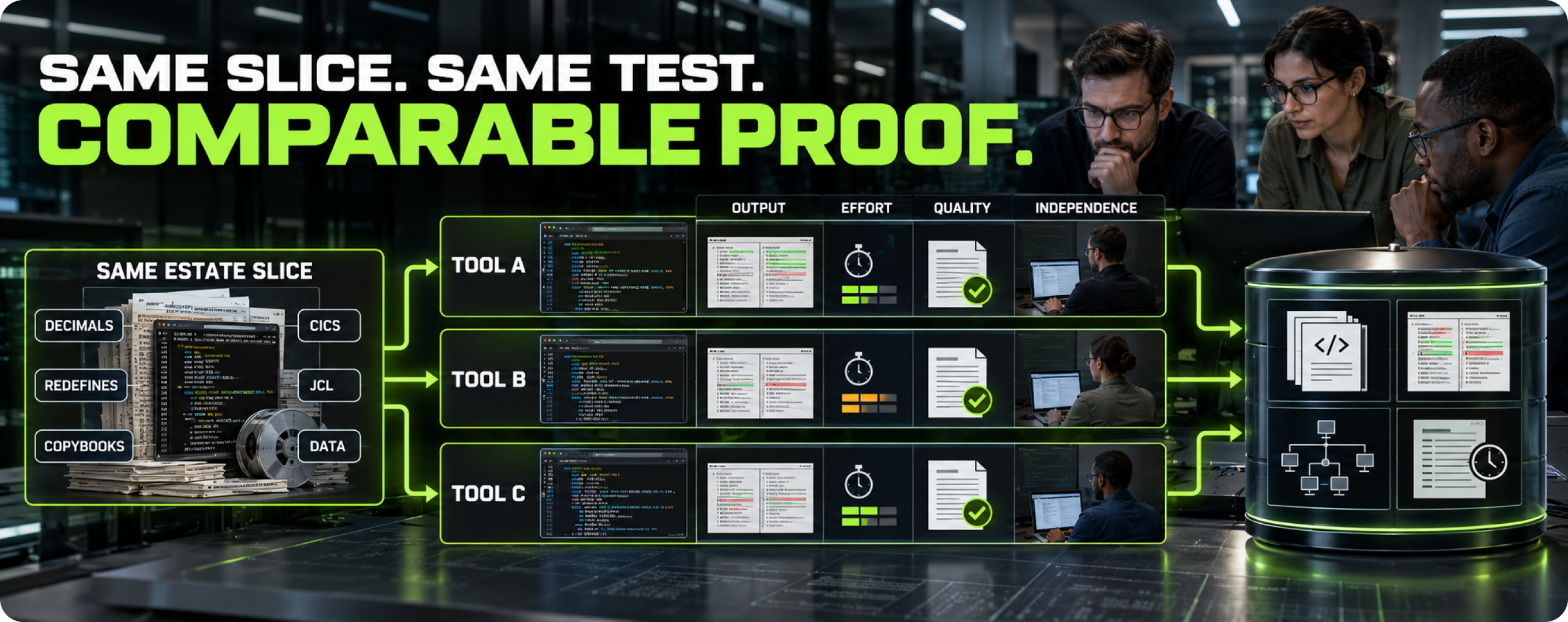
A proof of concept is the most reliable way to evaluate a tool in any category, provided it is designed to produce comparable evidence.
Use the same slice for every tool in a category. Choose a slice of your estate that includes the difficult features: dense decimal arithmetic, REDEFINES, shared copybooks, CICS, JCL and data. Give every candidate the same slice under the same conditions.
Write the success criteria first. Decide in advance what counts as success: verified outputs, readable code, a complete dependency model, accurate reconciliation, or whatever the category is meant to deliver. Share the criteria with every vendor.
Put your own people in the room. Your developers and analysts should run or at least observe the tool, and review its output independently. Their judgment of whether they could live with the tool for several years is part of the evidence.
Measure the effort around the tool. Record how long setup took, how many manual steps were needed and how much help the vendor had to provide. Tools that need constant vendor attention in a proof of concept will need it in production.
Keep the results. The analysis models, converted code, test data and comparison results from a proof of concept are useful assets whichever tool is chosen.
Five questions to ask about any COBOL modernization tool
Whatever the category, five questions quickly separate tools that will work on your estate from tools that work in demonstrations.
1. Will you run it on our code? A demonstration on the vendor’s sample tells you the tool works on the vendor’s sample. Ask for a run on a representative slice of your estate, including the awkward parts.
2. Which of our dialects and surrounding technologies does it handle in production? Ask for evidence of production use. A feature list is a claim.
3. What do we own afterwards? Output, models, rules, test assets and data. Also ask what ongoing license or runtime is needed for anything the tool produced.
4. Is the result repeatable? If you run the tool twice on the same input, do you get the same result? This matters for verification, for audit and for reapplying the process after the source changes.
5. How does it fit with the other categories? Can the analysis model feed the translator? Can the translator’s output enter your build pipeline? Can the testing tool compare outputs from the rehosted and translated versions? Tools that cannot exchange information create manual work at every boundary.
Common mistakes when choosing COBOL modernization tools
Choosing the tool before the strategy. A rehosting runtime and a translator solve different problems. Selecting one first fixes the strategy by accident.
Selecting on the demonstration. Demonstrations use clean code. Your estate has decades of workarounds, dialect features and dead code.
Treating testing as a later purchase. Testing tools are needed from the first converted program. Buying them late delays every wave.
Underestimating data. Programs that select a translation or rehosting tool and treat data migration as a subtask usually find that data sets the schedule.
Assuming a bundle is best in every part. Platform bundles are convenient, but each component should meet the standard you would expect if you bought it separately.
Using Gen AI as the conversion method for large estates. Gen AI assistants are valuable around the conversion. As the conversion method on business-critical code, they create a verification burden that grows with estate size.
Frequently asked questions
1. What are the main types of COBOL modernization tools?
Seven categories cover most of the market: discovery and static analysis, automated translation, Gen AI code assistants, rehosting and emulation runtimes, API enablement and integration, data migration, and testing and equivalence. Supporting tools for DevOps and program management sit around them.
2. What is the best tool for COBOL to Java conversion?
The best tool is the one that produces maintainable, verified Java from your specific code. Evaluate translators by running them on a representative sample of your estate, checking how they handle decimal arithmetic and complex data definitions, and having your own developers review the output.
3. Can Gen AI tools convert COBOL to Java on their own?
They can produce Java from COBOL, and on small, simple programs the result may be correct. On large estates with complex arithmetic and data definitions, the output needs thorough verification, and results are not repeatable run to run. Most programs use Gen AI for documentation, explanation and test generation alongside a deterministic translator.
4. Do we need a rehosting tool if we are translating COBOL?
Usually not for the long term. Some programs rehost first to leave the mainframe quickly and then translate on the new platform, which uses both categories in sequence.
5. Which COBOL modernization tools should we buy first?
Discovery and analysis tools, because their output shapes every other decision, followed closely by testing and equivalence tools, because they are on the critical path of every conversion wave.
6. Are open source COBOL modernization tools viable?
Open source plays a real role in some categories, particularly mainframe DevOps, and open source COBOL compilers exist for some workloads. For translation and large-scale analysis of complex estates, most organizations use commercial technology with dialect support and delivery experience behind it.
7. Should one vendor supply all of our COBOL modernization tools?
A single supplier simplifies contracts and integration, and some platforms cover several categories well. Judge each category on its own merits, though, and make sure the tools can exchange information with each other and with your own pipelines. The strongest analysis tool, translator and test harness for your estate may come from different sources.
8. How long does it take to evaluate COBOL modernization tools?
Evaluating one category, with a proof of concept on your own code, typically takes several weeks. Evaluating several categories in parallel is possible if the proof-of-concept slice is shared, which also tests how well the tools work together.
.png)

 info@semanticdesigns.com
