
Teams that search for Micro Focus COBOL to C# are usually in a specific position. Their COBOL does not run on a mainframe, or no longer does. It runs on Windows or Linux servers under Micro Focus tooling: Net Express or Server Express in older estates, Visual COBOL, or Enterprise Developer and Enterprise Server where mainframe workloads were rehosted. The rest of the organization has standardized on .NET, the developers they can hire write C#, and the COBOL has become the part of the stack that only a few people can change.
This article is for that team. It explains the four realistic paths from Micro Focus COBOL to C#, how to choose between them, which Micro Focus dialect features make translation harder, how to handle COBOL decimal arithmetic in C#, what happens to indexed files and embedded SQL, how to test the result and where Modernize Software fits. It assumes you know .NET well and COBOL less well.
Where Micro Focus COBOL estates sit today
A note on names first. Micro Focus was acquired by OpenText in 2023, and in May 2024 Rocket Software completed its purchase of the OpenText business that held the COBOL products. The products continue under Rocket’s name, for example Rocket Visual COBOL, and Rocket describes them as formerly Micro Focus products. Most teams still say “Micro Focus COBOL”, and this article does the same, because it is the name on the dialect, the compiler directives and the documentation your code was written against.
Micro Focus COBOL estates generally fall into four groups.
Long-lived distributed applications. Built on Micro Focus COBOL for Windows or UNIX, often decades ago, and moved forward through Net Express, Server Express and Visual COBOL. These applications frequently use Micro Focus indexed files, character screens or GUI front ends, and calls to C or operating system functions.
Rehosted mainframe applications. Moved off the mainframe onto Enterprise Server, which emulates CICS, JCL batch and other mainframe subsystems. The code is mainframe COBOL, compiled with directives that reproduce mainframe behavior, and sometimes still processing EBCDIC data.
Package software. Commercial applications written in Micro Focus COBOL, where the organization licenses the package and customizes parts of it.
Mixed estates. Applications that already combine COBOL with .NET, using managed COBOL compiled to .NET assemblies, with C# for the user interface or newer components.
The path to C# looks different for each group, so establishing which one you have, or which combination, is the first step.
Why .NET teams want to move from Micro Focus COBOL to C#
The motivations are usually a combination of these.
Skills and hiring. C# developers are plentiful; developers who know Micro Focus COBOL and the specific application are scarce, and many are near retirement.
One stack. Running COBOL alongside .NET means two build pipelines, two sets of tools, two debugging approaches and code that crosses a language boundary. Consolidating on C# simplifies development, operations and security review.
Runtime and tooling dependency. Micro Focus COBOL applications need the vendor’s compiler for development and its runtime for deployment. Organizations that want to remove that dependency, or reduce their exposure to future product and licensing decisions by a vendor, look at translation.
Modern practices. Automated testing, containerized deployment, cloud services and modern libraries are all easier to adopt in C#.
Product ownership changes. Two changes of ownership in two years prompted many customers to review their long-term plans for the platform, even where they remain satisfied with the products.
The strength of each motivation decides which path makes sense.
Four paths from Micro Focus COBOL to C#
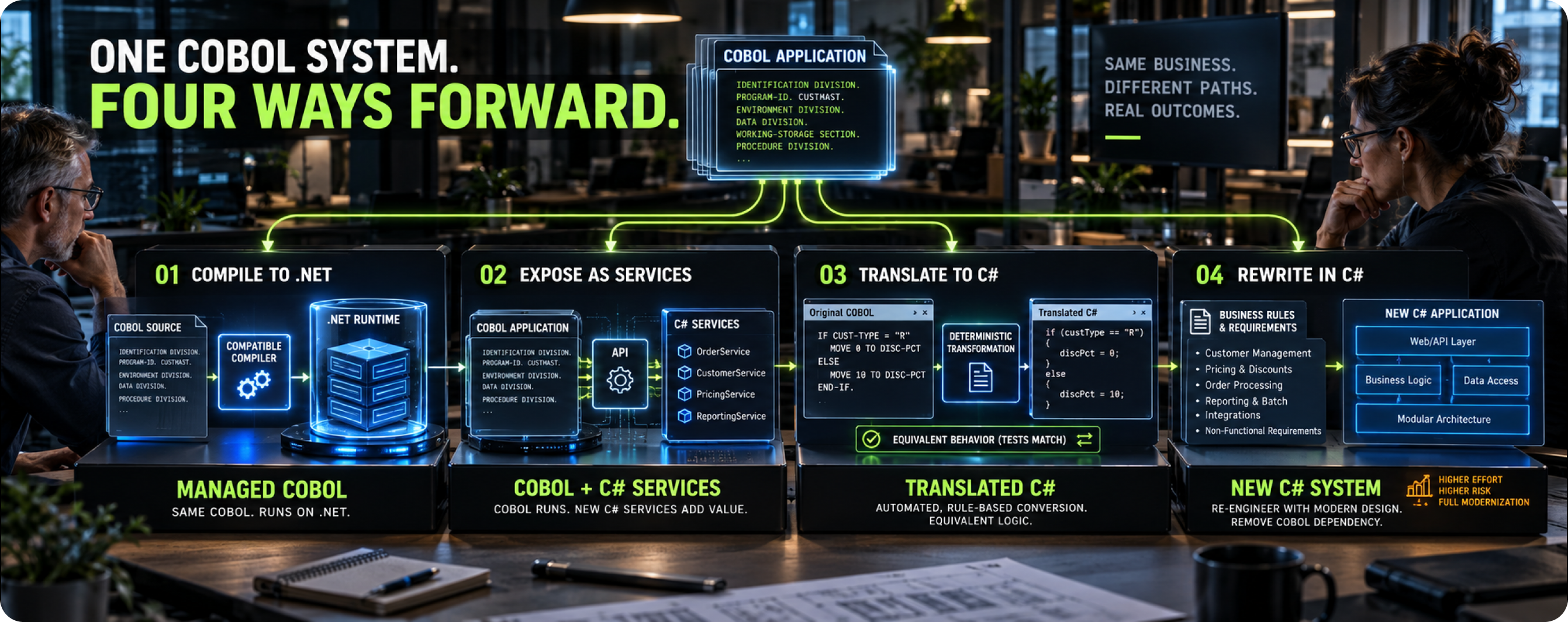
Path 1: Compile the COBOL to .NET managed code
Visual COBOL can compile COBOL to .NET assemblies, a feature often called managed COBOL. Procedural COBOL can be compiled for .NET with limited change, and object-oriented COBOL syntax lets COBOL classes interoperate directly with C# classes. This means C# code can call COBOL logic, and the COBOL can use .NET libraries.
Good for: integrating COBOL into a .NET application quickly, running everything in one process, and letting new work happen in C# around existing COBOL logic.
Limits: the code is still COBOL, so the skills dependency remains, and the application still needs the COBOL compiler for development and its runtime support for deployment. Some older features, such as certain character screen and dialog technologies, may need rework before they compile to managed code.
Rocket’s Visual COBOL overview describes the current product’s support for .NET, the JVM and interoperation with C# and Java.
Path 2: Expose the COBOL as services and build new work in C#
Keep the COBOL running on Enterprise Server or COBOL Server, expose its functions as web services or APIs, and write new functionality in C# that calls those services. Over time, functions can be reimplemented in C# one by one, with traffic moved from the COBOL service to the C# implementation as each is ready.
Good for: organizations that need new capability now and want to spread change over several years.
Limits: two platforms run in parallel for a long time, and incremental replacement programs often slow down once the easier functions have moved, leaving a long tail of COBOL services.
Path 3: Translate the COBOL to C#
Convert the COBOL source into C# with a rule-based translator, preserving behavior, and move data from Micro Focus files into a database or equivalent storage. The result is a C# application that builds with standard .NET tooling and runs without a COBOL runtime.
Good for: removing the COBOL dependency entirely, consolidating on .NET, and giving the application to C# developers to maintain and extend.
Limits: it needs a translator that understands the Micro Focus dialect and directives in your code, and a serious verification effort. The quality of the output varies widely between approaches, from C# that mirrors COBOL structure through a compatibility library to idiomatic C# with proper types and classes.
Path 4: Rewrite in C#
Build a new application in C#, using the COBOL and its documentation as the specification.
Good for: small applications, or applications whose business function has changed so much that preserving the existing logic has little value.
Limits: for large or complex applications, rediscovering every business rule by hand is slow and risky, and proving equivalence is harder because the design is different.
Choosing a path
The table summarizes how the paths compare on the factors that usually decide the choice.
| Factor | Managed COBOL | Services plus C# | Translate to C# | Rewrite in C# |
|---|---|---|---|---|
| Removes COBOL skills dependency | No | Gradually | Yes | Yes |
| Removes COBOL runtime dependency | No | Gradually | Yes | Yes |
| Time to first result | Short | Short | Medium | Long |
| Preserves existing behavior | Yes | Yes | Yes, with verification | Only by rediscovery |
| Allows redesign | Limited | For new functions | After translation | Yes |
| Risk for large applications | Low | Medium | Medium | High |
Many organizations combine paths. A common sequence is to translate the core application to C#, which removes the dependency and preserves behavior, and then refactor the resulting C# toward a new architecture with the safety of a working, tested codebase. Another is to use managed COBOL as a short-term bridge while translation proceeds.
Assess the estate before you choose a path
Micro Focus estates have their own surprises, and a short assessment before choosing a path avoids most of them. These are the items worth checking.
Source completeness. Confirm that source exists for every program in production. Micro Focus deployments run compiled intermediate, generated or native code, and older estates sometimes contain programs whose source was lost or no longer matches the deployed version. Rebuilding from source and comparing against production is the reliable check.
Directive sets. Collect the directives used for every program from build scripts, project files and $SET statements. Group programs by directive set, because each group may behave differently.
Dialect features in use. Measure how much of the code uses screens, dialog or GUI technologies, calls to C or operating system functions, object-oriented COBOL, embedded SQL and each file organization.
Third-party components. List any third-party COBOL libraries, report writers, sort utilities or file handlers the application depends on, and whether their source is available.
Data stores. Inventory the indexed and sequential files, their formats and sizes, the programs that use them, and any relational databases.
Deployment and operations. Record how the application is scheduled, deployed and monitored, and which Enterprise Server or COBOL Server configurations it relies on.
People. Identify who knows each part of the system, and what they know that is not written down.
The assessment shapes the choice of path directly. An estate with heavy screen use and little batch may point toward a new user interface over translated logic. An estate with missing source for key programs has a problem to solve before any path is viable.
A useful rule for the assessment is to trust the build and the production system over any document. Directive files, project settings and deployed binaries show how the application really behaves; design documents written years ago often describe an earlier version.
Micro Focus dialect features that complicate translation to C#
Micro Focus COBOL is a rich dialect with many extensions. A translator, or a team doing the work by hand, has to handle each of the following correctly.
Compiler directives and dialect settings
Micro Focus behavior is controlled by directives, set on the command line, in directive files or in $SET statements in the source. The DIALECT directive and related settings make the compiler behave like other COBOL variants, such as IBM Enterprise COBOL or older ANSI standards, and individual directives change the treatment of arithmetic, truncation, file handling and reserved words. Two programs with identical source can behave differently if they were compiled with different directives. The directive set for each program is therefore an input to translation, and it must be recovered from the build scripts and project files.
File handling
Micro Focus supports sequential, line sequential, relative and indexed files, with several indexed file formats selectable by directive. Programs rely on specific behaviors: file status codes, record locking, variable-length records and the extended status codes the runtime returns for errors, where the first status byte is 9 and the second carries a runtime error number. A C# translation typically moves indexed files into a relational database, with each file becoming one or more tables and each key becoming an index. The translated code must reproduce the file status behavior that the COBOL checks, or the logic that depends on it will behave differently.
Embedded SQL
Many Micro Focus applications use EXEC SQL with the vendor’s embedded SQL preprocessors to reach relational databases. In C#, embedded SQL becomes ADO.NET or a data access layer, with host variables becoming parameters, cursors becoming readers and SQLCODE checks becoming exception handling or result checks. Null indicators, date and time conversions and decimal precision in the database mapping all need care.
Screens and user interfaces
Character-based applications may use the SCREEN SECTION or extended ACCEPT and DISPLAY statements to drive terminal screens, and some use Micro Focus dialog and GUI technologies. None of these has a direct C# equivalent. The usual options are to generate a web or desktop front end that reproduces the screen flow, or to redesign the user interface while keeping the business logic behind it. This is often the part of a Micro Focus COBOL to C# program that needs the most business input.
Calls to other languages and the operating system
Micro Focus COBOL can call C functions, operating system APIs and other COBOL programs through static and dynamic calls, with various calling conventions. Dynamic calls, where the program name is in a variable, need to be resolved to C# method calls or a dispatch mechanism. Calls into native libraries become P/Invoke declarations or replacements with .NET library equivalents.
COMP-5 and native binary data
COMP-5 fields are stored in the machine’s native byte order and are not truncated to their picture size in the way standard binary fields may be. When data files containing binary fields move between platforms, or into a database, byte order and truncation rules must be handled explicitly.
Object-oriented and managed COBOL
Estates that already use object-oriented COBOL or managed COBOL for .NET have a head start. Classes, methods and interfaces map fairly directly to C#, and calls into .NET libraries are already in .NET form. The procedural code inside methods still needs the same treatment as any other COBOL.
Constants and other syntax extensions
Micro Focus COBOL accepts syntax that standard COBOL does not, including level-78 constant definitions, extended forms of PERFORM, additional intrinsic functions and features borrowed from other dialects when the relevant directives are set. Each extension needs a mapping in the translation. Level-78 constants, for example, become C# const fields or static readonly values, and their uses in data definitions, such as table sizes, have to be resolved at translation time.
Mainframe-compatible code on Enterprise Server
Applications rehosted onto Enterprise Server carry CICS commands, JCL, mainframe utilities and sometimes EBCDIC data. Translating them to C# involves the same work as a mainframe COBOL to C# conversion, with the added complication that the rehosting may have introduced its own configuration and adaptations that also need to be carried across.
COBOL decimal arithmetic in C#

C# has an advantage over Java for COBOL translation: its built-in decimal type is a base-10 type designed for financial calculations, which makes the translated code less verbose than Java’s BigDecimal. It still needs care in four areas.
Range and precision
System.Decimal holds 28 to 29 significant digits. Many COBOL compilers allow numeric items of up to 31 digits, and some allow more, depending on directives. Most business fields are far smaller, but an inventory of the estate should confirm that no field or intermediate result exceeds the decimal range. If any do, those cases need a different representation.
Rounding
COBOL ROUNDED, with no mode specified, rounds half away from zero. C#’s Math.Round and decimal.Round default to banker’s rounding, which rounds half to even. That default will silently produce different results on exact halves. Every rounded operation must specify MidpointRounding.AwayFromZero explicitly.
Truncation
Without ROUNDED, COBOL truncates excess fractional digits. In C#, Math.Round(value, 2, MidpointRounding.ToZero) truncates to two decimal places, and MidpointRounding.ToZero is available in current .NET versions.
Intermediate results and size errors
COBOL computes intermediate results to a precision determined by the compiler and its directives. C# decimal division rounds its result to fit the type’s precision, which will not always match. Where results must match exactly, the translation should apply the compiler’s intermediate precision explicitly. Size errors also need explicit handling: COBOL either runs the ON SIZE ERROR branch or, without that clause, truncates high-order digits, while C# decimal simply holds the larger value or throws an overflow exception at the edge of its range.
An example
The COBOL:
COMPUTE WS-MONTHLY-INT ROUNDED =
    LR-BALANCE * LR-ANNUAL-RATE / 12
    ON SIZE ERROR
        MOVE ZERO TO WS-MONTHLY-INT
        SET INT-OVERFLOW TO TRUE
END-COMPUTE
A C# translation:
const decimal MaxMonthlyInt = 9_999_999.99m;  // PIC S9(7)V99
const int IntermediateScale = 12;             // match your compiler's rules

decimal product    = loan.Balance * loan.AnnualRate;
decimal quotient   = Math.Round(product / 12m, IntermediateScale, MidpointRounding.ToZero);
decimal monthlyInt = Math.Round(quotient, 2, MidpointRounding.AwayFromZero);  // ROUNDED

if (Math.Abs(monthlyInt) > MaxMonthlyInt)     // ON SIZE ERROR
{
    monthlyInt  = 0m;
    intOverflow = true;
}
Without the explicit rounding modes and the range check, this code would compile and run and still produce different results on some inputs.
Moving the data
Micro Focus COBOL applications usually keep their data in indexed files, sometimes alongside a relational database. Moving to C# is a good moment to move the files into a database, though it is not the only option.
Indexed files to relational tables. Each file becomes one or more tables, keys become indexes and record layouts become columns. REDEFINES and OCCURS structures need design decisions: separate tables for repeating groups, type-specific tables for redefined records, or columns that preserve the original layout where the design is too irregular to normalize safely at this stage.
File semantics in the code. The translated code must reproduce the access patterns the COBOL relies on, such as reading the next record in key order, starting at a partial key and handling duplicate keys, through database queries or a data access layer that provides the same behavior.
Encoding and formats. Distributed Micro Focus applications usually store data in ASCII-based encodings, but rehosted mainframe applications on Enterprise Server may still use EBCDIC. Packed decimal and binary fields in files must be decoded according to their definitions, with byte order considered for native binary fields.
Reconciliation. Every migrated file should be reconciled by record counts, key checks and control totals of the important numeric fields, with reports kept as evidence.
What the translated C# should look like
The C# you receive decides whether the program was worth doing. Code that wraps every COBOL field in a compatibility object and every statement in a library call will run, but your C# developers will not want to maintain it, and the dependency on a runtime has moved without disappearing.
Idiomatic translated C# has these characteristics:
- Records and groups become classes or records with typed properties.
- Numeric fields become decimal, int or long as their definitions require, with explicit rounding.
- Condition names become boolean properties or enums.
- Paragraphs and sections become methods, with clear names derived from the originals.
- File access becomes calls to a data access layer with a clear interface.
- The code builds with the standard .NET SDK and runs without COBOL runtime components.
- Comments or mapping files trace each part of the C# to its COBOL origin, which helps verification and maintenance.
Ask to see translated C# from your own code before choosing a translation approach, and have your own developers review it. Give them a real maintenance task on the translated code, such as adding a field or changing a rate rule, and ask how long it took and how confident they felt. That exercise tells you more about long-term maintainability than any review checklist.
Target a supported .NET release for the translated application. Microsoft’s .NET support policy lists which versions receive long-term support, and it is sensible to plan the migration so that the application lands on a long-term support release with time left in its support window.
Testing and cutover
Verification for a Micro Focus COBOL to C# migration follows the same principles as any COBOL migration.
Build the comparison harness early. Run the COBOL and C# versions on the same inputs and compare outputs: files, reports, database state and screen results. Build this harness before translation starts, so that every translated program can be tested as soon as it exists.
Target the dialect-specific traps. Test data should deliberately include rounding halves, negative values, values near field limits, file status conditions such as duplicate keys and missing records, and the directive-dependent behaviors identified during assessment.
Run through business cycles. Batch processes that run monthly, quarterly or annually need to be tested through those cycles as well as on daily runs.
Record approved differences. Some differences will be improvements, such as an error that the COBOL ignored and the C# reports. Each should be listed, approved and tested as an intentional change.
Cut over in waves. Group programs by shared data and business function, and move each group through translation, data migration, testing and cutover in turn. Keep a fallback plan for each wave until the new system has run through at least one full cycle.
Our analysis of what drives COBOL migration cost is written for Java targets, but its points about dialect spread, copybook sprawl and data migration apply equally to C#.
Managing the transition period
Whichever path you choose, COBOL and C# will run side by side for a while. Plan for it deliberately.
Keep the Micro Focus development and runtime environment supported until the last program has moved, and check that your license terms cover the full transition. Decide how changes made to the COBOL during the migration will reach the C#, so that nothing is lost at cutover; with deterministic translation, the simplest answer is to reconvert the changed programs. Where COBOL and C# components share data, make sure they never write the same records under different rules. And keep the people who know the COBOL involved until the end, because their knowledge is most valuable during verification, when differences need explaining.
Where Modernize Software fits
Modernize Software is the modernization practice of Semantic Designs, building code transformation tooling in Austin since 1995. Our COBOL to C# service translates COBOL into maintainable C# that builds with standard .NET tooling and runs without a COBOL runtime. You own the output outright, with no runtime royalties and no ongoing license.
Translation runs on DMS, which combines symbolic AI with enhanced compiler technology. It parses 13 COBOL dialects natively, treats each program’s compiler directives as an input to translation, and applies rules consistently across the estate. Decimal arithmetic maps to C# decimal with rounding that matches the original. Recent COBOL to C# projects measured 99.9 and 99.998 percent automation, with anything outside the rules flagged for engineer review. Because translation is deterministic, programs changed mid-migration are simply reconverted. Gen AI handles documentation and test generation only. Target architecture is your call: functional-equivalent C#, or a modern .NET shape with DI and EF Core. Many estates also carry Visual Basic 6, and our VB6 to .NET migration service can run alongside.
Frequently asked questions
1. Can Micro Focus COBOL be converted to C# automatically?
Yes. Rule-based translators convert Micro Focus COBOL to C#, including data definitions, arithmetic, control flow, file handling and embedded SQL. The translator must understand the Micro Focus dialect and the compiler directives each program uses, and the output should be verified by running old and new versions on the same inputs.
2. Is managed COBOL the same as converting to C#?
No. Managed COBOL compiles COBOL source into .NET assemblies, so COBOL and C# can run together in .NET, but the source code remains COBOL and still needs COBOL skills and tooling. Converting to C# produces C# source that .NET developers can maintain without COBOL.
3. Who owns Micro Focus COBOL now?
OpenText acquired Micro Focus in 2023, and Rocket Software completed its acquisition of OpenText’s application modernization and connectivity business, which includes the COBOL products, in May 2024. The products continue under Rocket’s name.
4. How does COBOL ROUNDED map to C#?
Use Math.Round or decimal.Round with MidpointRounding.AwayFromZero. The default in C# is banker’s rounding, which gives different results on exact halves.
5. What happens to Micro Focus indexed files in a C# migration?
They are usually migrated to relational database tables, with keys becoming indexes. The translated C# accesses them through a data access layer that reproduces the sequential, keyed and partial-key access patterns the COBOL relied on.
6. Can we translate only part of a Micro Focus COBOL application?
Yes. Many programs move in waves, with translated C# and remaining COBOL coexisting for a period. Managed COBOL or service interfaces can bridge the two while the migration proceeds.
7. Do we still need Micro Focus licenses during the migration?
Usually yes, for as long as any COBOL remains in development or production. Check the terms of your current agreements against the migration plan, including development seats, runtime or server licenses and support, so that the transition period is covered.
8. Can the translated C# run on Linux or in containers?
Yes. Modern .NET runs on Windows, Linux and macOS and is well suited to containers, so translated C# can move to Linux servers or a cloud container platform. That is often one of the benefits of leaving a Windows-based COBOL runtime.
.png)

 info@semanticdesigns.com
